
EPFO Passbook 2026: Passbook Lite, Annexure K & Entries
Your EPFO passbook is the record of every contribution, transfer, withdrawal and interest credit under your UAN. Since September 2025 you can see it in two places:
- Passbook Lite, a quick summary inside the Member Portal.
- The full passbook portal, which has the complete month-by-month record.
To log in and download the PDF, follow the steps in our passbook section on the homepage. This page explains what to do with the passbook once it’s open.
Passbook Lite or the Full Passbook: Which One to Open
EPFO added Passbook Lite to the Member Portal in September 2025. Before that, checking a single contribution meant logging in to a second website.
| Passbook Lite | Full passbook portal | |
|---|---|---|
| Where | Inside the Member Portal, after you log in | passbook.epfindia.gov.in |
| What it shows | A summary of contributions, withdrawals and balance | Every entry month by month, plus graphs |
| Best for | A quick check while you’re filing a claim or updating KYC | Checking an employer’s deposits, interest, or a transfer |
| Second login? | No | Yes, with the same UAN and password |
Rule of thumb: if you only need to know “roughly how much is there”, use Passbook Lite. If you’re checking whether something went wrong, open the full passbook. Lite gives you totals, and totals hide gaps.
Entries That Confuse People
Most passbook worries come from four kinds of entries, not from missing money.
- A large one-time credit you don’t recognise. This is usually a transfer-in from an old Member ID. The balance from your previous job arrives in one lump sum, not month by month.
- A sudden drop in the balance. Check whether you took an advance or partial withdrawal. Those show as debits from your EPF balance.
- One interest entry a year. Interest doesn’t appear monthly, even though it builds up on your balance every month. It shows up as a single credit once the year’s rate has been approved.
- A balance that seems to “restart”. A new financial year opens with the previous year’s closing balance carried forward. Compare the opening figure with last year’s closing figure. They should match.
When to worry: a month with no contribution at all while you were working, or a transfer you filed that never shows up. Both are covered below.
Taxable and Non-Taxable Balance: Who This Affects
From 2021-22, PF contributions above a yearly limit are kept separately for tax:
- The limit is ₹2.5 lakh a year. It’s ₹5 lakh if your employer makes no contribution to your PF, which is common for government employees.
- Only interest on the amount above the limit is taxable. Your contributions and the interest on everything under the limit stay tax-free.
- That’s why some passbooks show the balance in two parts. It’s an accounting split, not two separate accounts you have to manage.
Does it apply to you? Most salaried members are well under ₹2.5 lakh a year. You usually only cross it if you put a large amount into VPF (Voluntary Provident Fund) on top of your regular 12%.
If you do cross it, the interest on the taxable part must be reported in your income tax return. EPFO deducts TDS on it.
Use the Passbook to Check Your Employer
EPFO’s own guidance is that members can check every month, through the e-passbook, whether their employer actually deposited their PF. It’s the easiest compliance check you have.
- Look at your payslip. Note the PF deducted for the month.
- Open the full passbook a few weeks later. Find the same wage month.
- Match the employee share. It should equal your payslip deduction.
- Watch for the SMS. EPFO sends one to your registered mobile when a monthly contribution is credited. If several months pass with no SMS, open the passbook.
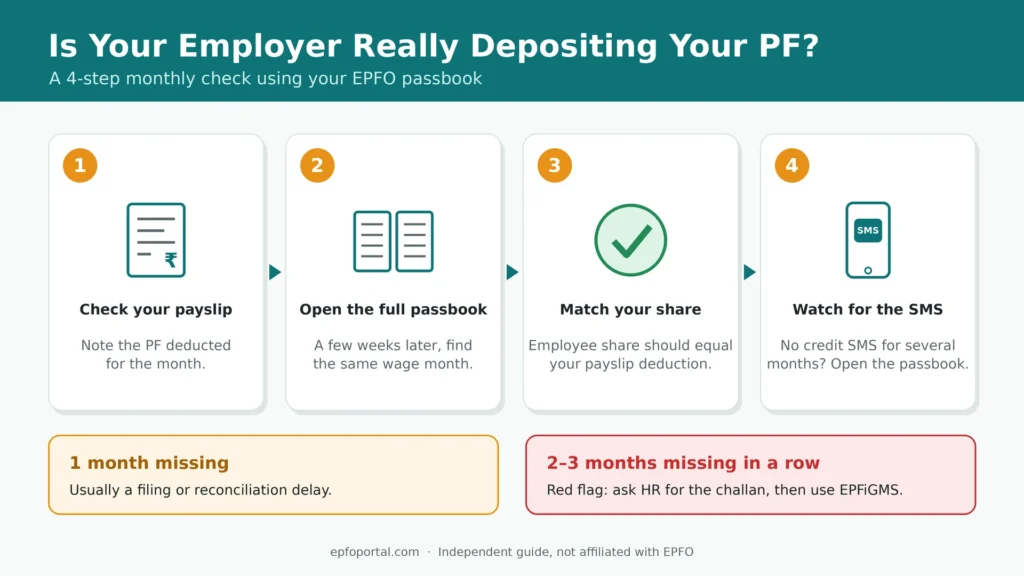
One missing month is usually a delay. Your employer may have filed late, or the entry hasn’t been reconciled at the field office yet.
Two or three missing months in a row, while PF was still being cut from your salary, is a red flag. Keep your payslips for those months, ask HR in writing for the payment details (the challan), and raise a complaint on EPFiGMS if the money still doesn’t appear.
Member ID Problems
An old Member ID still shows a balance.
That money hasn’t been transferred to your current account. EPFO’s guidance is to file an online transfer claim. See our transfer steps for job changers. Until it moves, that balance stays with the old employer’s PF account.
Your current Member ID is missing.
Your employer may not have filed its first return for you yet. Or it may be an exempted establishment that runs its own PF trust. In that case your PF statement comes from the trust, not the EPFO passbook.
Two Member IDs under the same employer.
This happens when you leave and rejoin the same company. Each spell of employment gets its own Member ID. You can merge them with a transfer request, just like moving between two different employers.
Annexure K: Proof Your Transfer Actually Happened
A transfer showing as “settled” doesn’t prove your service history moved with it. Annexure K does.
What it is: when you transfer PF using Form 13, your old PF office creates Annexure K, a transfer certificate, and sends it to your new PF office. It lists:
- the amount transferred, and
- your service details.
What changed: until September 2025, members only got it on request. Now you can download Annexure K as a PDF from the Member Portal.
Why it’s worth downloading:
- Your pension depends on it. Your EPS pension depends on total service across all jobs, and Annexure K is the record that carries your earlier service forward.
- It lets you check the figures. Compare the amount on it with the transfer-in entry in your new passbook. They should match.
- It’s your proof. It’s a permanent copy you hold, not something you need to ask an office for years later.
Do this every time you change jobs: download it once the transfer settles and keep it with your appointment letters.
Frequently Asked Questions
- What is EPFO Passbook Lite?
A summary of your PF contributions, withdrawals and balance, shown inside the Member Portal. It was launched in September 2025 so members don’t need a separate passbook login for a quick check. - Is Passbook Lite enough instead of the full passbook?
For a balance check, yes. To check individual months, interest or transfers, use the full passbook portal. - Why is part of my EPF balance shown as taxable?
Your contributions went over ₹2.5 lakh in a year (₹5 lakh if your employer doesn’t contribute). Interest on the excess is taxable. The rest stays tax-free. - My passbook shows a balance in an old Member ID. Is that money lost?
No. It hasn’t been transferred yet. File an online transfer claim to move it to your current account. - Where can I get Annexure K?
Download it as a PDF from the EPFO Member Portal once your transfer has been processed. - Can I see my passbook without a UAN?
No. The e-passbook works only with an activated UAN. If your employer runs its own PF trust, ask the trust for your statement instead.