EPFO Login Not Working? Fix Password, OTP & UAN Errors
To log in to EPFO, open unifiedportal-mem.epfindia.gov.in. Enter your activated 12-digit UAN, your password and the captcha, then confirm the OTP sent to the mobile number registered with your UAN. If any one of those is missing or out of date, the login fails.
The standard sign-in steps are on our EPFO Portal homepage. This guide covers what to do when those steps don’t work.
Check These Four Things Before You Try Again
Most failed EPFO logins come down to one of these four. Check them in order. Retrying the same failing login only makes it worse.
| What you need | Why login fails without it | How to check |
|---|---|---|
| An activated UAN | Having a UAN is not the same as having an active one. An inactive UAN cannot sign in. | If you have never set a password for it, it isn’t active. Activate it through UMANG Face Authentication. |
| Your current password | A password from years ago, or one changed on another device, will be refused. | If you’re not sure, reset it (steps below) instead of guessing. |
| A working registered mobile | The OTP only goes to the number on your UAN record. | Ask yourself whether that number is still yours and still active. |
| The right page | The Member Portal and the Passbook Portal take the same login but are separate sites. | Claims and KYC are on the Member Portal. Balance and contribution entries are on the Passbook Portal. |
What Changed After the 2026 Portal Upgrade
EPFO upgraded the Unified Member Portal in mid-2026. Two changes now cause the most confusion:
- UAN activation and new UAN generation happen through Aadhaar Face Authentication in the UMANG app. Older tutorials that show web-only activation with an “Authorisation PIN” may no longer match what you see. If the website doesn’t offer you activation, use UMANG.
- Claim status is now behind a login. EPFO moved the UAN-based claim status check inside the member passbook application to protect members’ data and reduce fraud. If a page asks for your password before showing your claim, that is expected.
EPFO Login Problems and the Fix That Works
| What you see | Most likely cause | What to do |
|---|---|---|
| UAN or password not accepted | A typo, Caps Lock on, an old password, or a UAN that was never activated | Type it again carefully. If it still fails, reset the password. Don’t keep guessing. |
| Login blocked after several attempts | A security block after repeated wrong entries | Stop trying. Reset the password with Forgot Password, then sign in with the new one. |
| OTP never arrives | The number on your UAN record is old or switched off, there’s a weak signal, or the portal is busy | Confirm which number is registered. If it’s an old SIM, update your mobile number first. |
| Passbook rejects a password you just changed | Changes take up to 6 hours to reach the Passbook Portal | Use the Member Portal now and try the passbook after 6 hours. |
| Passbook unavailable right after you activated your UAN | The passbook opens 6 hours after registration | Wait 6 hours, then log in. |
| No passbook for your current employer’s Member ID | Your employer is an exempted establishment and runs its own PF trust | EPFO’s passbook doesn’t cover these accounts. Ask your employer’s PF trust for a statement. |
| Recent contributions not showing | The passbook only shows entries already reconciled at EPFO field offices | Give it time. If it’s still missing, ask HR whether the return was filed. |
| Captcha keeps failing or the page freezes | Your session timed out, old cached data, or heavy traffic | Refresh the captcha, try a private browser window, or try outside office hours. |
Why the 6-hour delay matters: many people reset their password, can’t open the passbook, and assume the reset failed. They reset again and lose more time. The Member Portal accepts the new password straight away; the passbook catches up later.
How to Reset a Forgotten EPFO Password
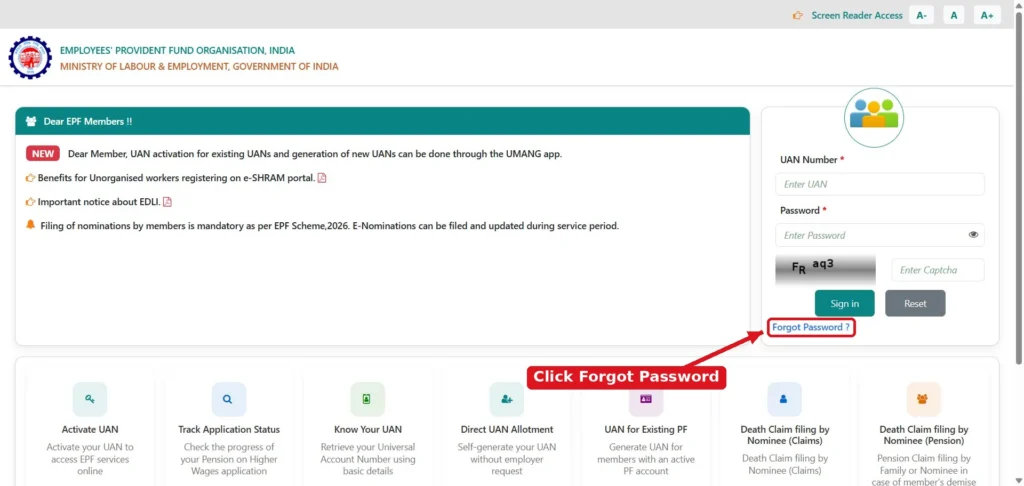
- On the Member Portal login page, click Forgot Password? below the Sign in button.
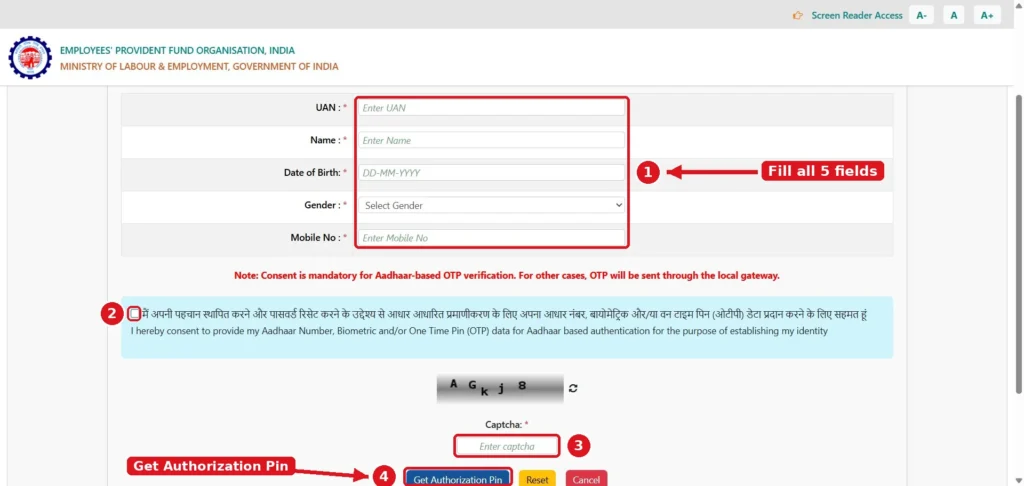
- Enter your UAN, Name, Date of Birth, Gender and Mobile No. exactly as they appear in your EPFO records.
- Tick the consent box if you want the OTP verified through Aadhaar. Without consent, the portal sends the OTP through its own SMS gateway instead.
- Type the captcha and click Get Authorization Pin.
- Enter the OTP sent to your mobile.
- Set a new password and sign in.
The one thing that stops a reset: the OTP must reach you. If your registered number is no longer active, the reset can’t be completed. Fix the mobile number first.
If you’ve also lost your UAN: you can’t reset a password without it. Recover your UAN first using the Know Your UAN method on our homepage.
Signs Your Problem Isn’t the Login
Sometimes you get in fine, but what you see after login looks wrong. Resetting your password won’t fix these:
- An old employer’s Member ID is missing. The account may sit under a second UAN. See how duplicate UANs are merged.
- The balance looks wrong. Check it in the passbook, keeping the reconciliation delay in mind.
- A claim is stuck. Track it through the claim status steps.
Pensioners: You May Not Need a UAN Login
If you only want to know whether your pension has been paid, you don’t need to log in at all. EPFO’s Pension Payment Enquiry works with your PPO (Pension Payment Order) number.
Keep the PPO number written somewhere safe. It’s printed on your pension order and is the key reference for anything pension-related.
Keep Your EPFO Login Secure
Your UAN password gives access to your service history, KYC details and claim requests. Protect it like a bank password.
- Never give it to “PF agents” or apps that offer faster withdrawals. Anyone who has it can act on your account.
- On shared or office computers, don’t let the browser save your password. Log out when you’re done.
- Change your password right away if you’ve ever shared it, even with someone you trust.
- An OTP is permission to act on your account. Don’t share it with anyone, for any reason.
Still Locked Out After All This?
If the four checks pass and a reset still doesn’t work, the problem is in your EPFO record, not your browser. Raise a complaint on EPFiGMS and include:
- your UAN,
- a screenshot of the exact error,
- the date and time it happened, and
- what you’ve already tried.
A complaint with these details gets a useful reply much faster than “login not working”. Phone helplines and escalation steps are in our grievance guide.
Frequently Asked Questions
Are the Member Portal and passbook passwords different?
No. Both use the same UAN password. A change on the Member Portal can take up to 6 hours to work on the Passbook Portal.
Can I check my PF claim status without logging in?
No. EPFO now shows claim status only after you sign in with your UAN and password.
Why can’t I see a passbook even though I have a UAN?
Either your UAN was registered less than 6 hours ago, or your employer is an exempted establishment whose PF is managed by its own trust.
Why does my passbook not show last month’s contribution after I log in?
The passbook lists only entries reconciled at EPFO field offices, so recent contributions can take time to appear.
My password reset keeps failing. What’s wrong?
Almost always the OTP isn’t reaching you because the registered number is outdated. Update the number first, then reset.
Is epfoportal.com the official EPFO website?
No. This is an independent guide. Always sign in only on the official epfindia.gov.in portals linked on this page.